Fireball 1.2: More useful accounts, smarter refunds and faster planning
Fireball 1.2 adds a useful Free Plan, manual bank tracking, Afterpay support, smarter refunds, stronger syncing and faster everyday screens.
A money app is most useful when it keeps working through the messy parts of real life. A bank connection can stop. A flatmate can repay several bills at once. An account can take time to finish importing. A useful update should make those moments easier, not simply add another chart.
Fireball 1.2 focuses on that everyday reliability.
Version 1.2.0 introduces a more useful Free Plan, manual tracking for eligible disconnected bank accounts, Afterpay Pay in 4 detection, more flexible transaction tools and a calmer experience across the app.
Version 1.2.1 builds on that foundation with smarter refund matching, more durable edits, stronger bank history recovery, improved reminders and faster startup.
What changed in Fireball 1.2.0
Keep using an account when bank syncing stops
A disconnected bank account still contains useful history. Fireball 1.2.0 can let you continue an eligible account with Manual tracking instead of forcing you to start again with a separate account.
Fireball keeps the imported history and the original account identity. You confirm an opening balance and date, then record new activity manually from that point. This works for everyday accounts and supported revolving credit accounts, including credit cards and revolving home loans.
Manual tracking does not create a bank connection or move money. It keeps your financial picture useful while automatic syncing is unavailable.
See Afterpay plans in recurring activity
Pay in 4 purchases can be easy to lose among ordinary transactions. Fireball 1.2.0 can recognise supported Afterpay payment patterns from your bank activity and present them as a four payment plan in Recurring.
When the evidence is clear, Fireball can identify the schedule automatically. When dates or matches are uncertain, the plan appears in Needs Review and has no effect on Safe to Spend until you confirm it.
The timeline distinguishes paid, pending and upcoming payments. Fireball reserves only the unpaid scheduled amounts, avoids counting a pending payment twice and stops forecasting after the fourth payment is confirmed.
This feature reads the bank transactions already available to Fireball. It does not connect to your Afterpay account, create a new debt balance, add a purchase transaction or change your bank records.
A Free Plan that keeps the core useful
Fireball 1.2.0 makes the verified personal experience useful without an active paid subscription.
The Free Plan includes core manual money management, such as manual accounts and assets, transaction organisation, budgets, goals, basic FIRE planning, monitors, file imports, transaction exports and access to retained bank history.
The Free Plan also gives manual users a practical path to try connected banking without losing the ability to keep tracking afterward. If you are eligible for a Fireball trial, you can use it to connect supported bank accounts and bring their available history into Fireball. When the trial ends and automatic bank syncing stops, you can convert eligible connected accounts to Manual tracking and keep recording new activity yourself.
If you later decide to subscribe, you can reconnect those accounts and return to automatic bank syncing. Fireball provides a reconciliation path that reviews the manual period against the newly available bank data. You can keep valid manual entries while avoiding duplicate transactions and double counted balances.
Paid access still covers services that create an ongoing external cost or richer experience, including live bank syncing, financial AI, Markets and advanced insights. Fireball shows those choices where they are relevant instead of blocking the whole app with a subscription screen.
If paid access ends, your permitted manual information and retained history remain available. Bank refresh and other paid services stop until access is restored.
More control over your transaction data
You can export the personal Activity information already available in Fireball to CSV. Export from Activity to keep the current filters, or start from Data management to use all available posted transactions. The export can include categories, splits, tags, notes, references, status and transfer information.
Fireball also gives you more control when importing bank CSV files. If a file uses unfamiliar headings, you can choose the header row, date, description, amount columns, date order and amount signs before reviewing the transactions. A successful mapping can be remembered locally for another file with the same column layout.
Ignored transactions can now be reviewed from Data management and restored when needed. Together, these tools make it easier to bring information into Fireball, correct it and take a readable copy out again.
A calmer experience while information loads
Financial data does not always arrive at the same time. Version 1.2.0 improves loading across Home, Accounts, Insights, Activity, Markets and other detailed screens.
Where useful information is already available, Fireball keeps it visible while a newer result loads. A chart or section can show its own loading or retry state without hiding the rest of the page. This makes the app feel steadier when a connection is slow or one calculation needs more time.
Wide screens also make better use of their space. Home, Accounts, Activity, Settings and several review screens can show related information side by side while keeping one clear page scroll. Compact screens retain the focused mobile layout.
What changed in Fireball 1.2.1
Match one repayment to several expenses
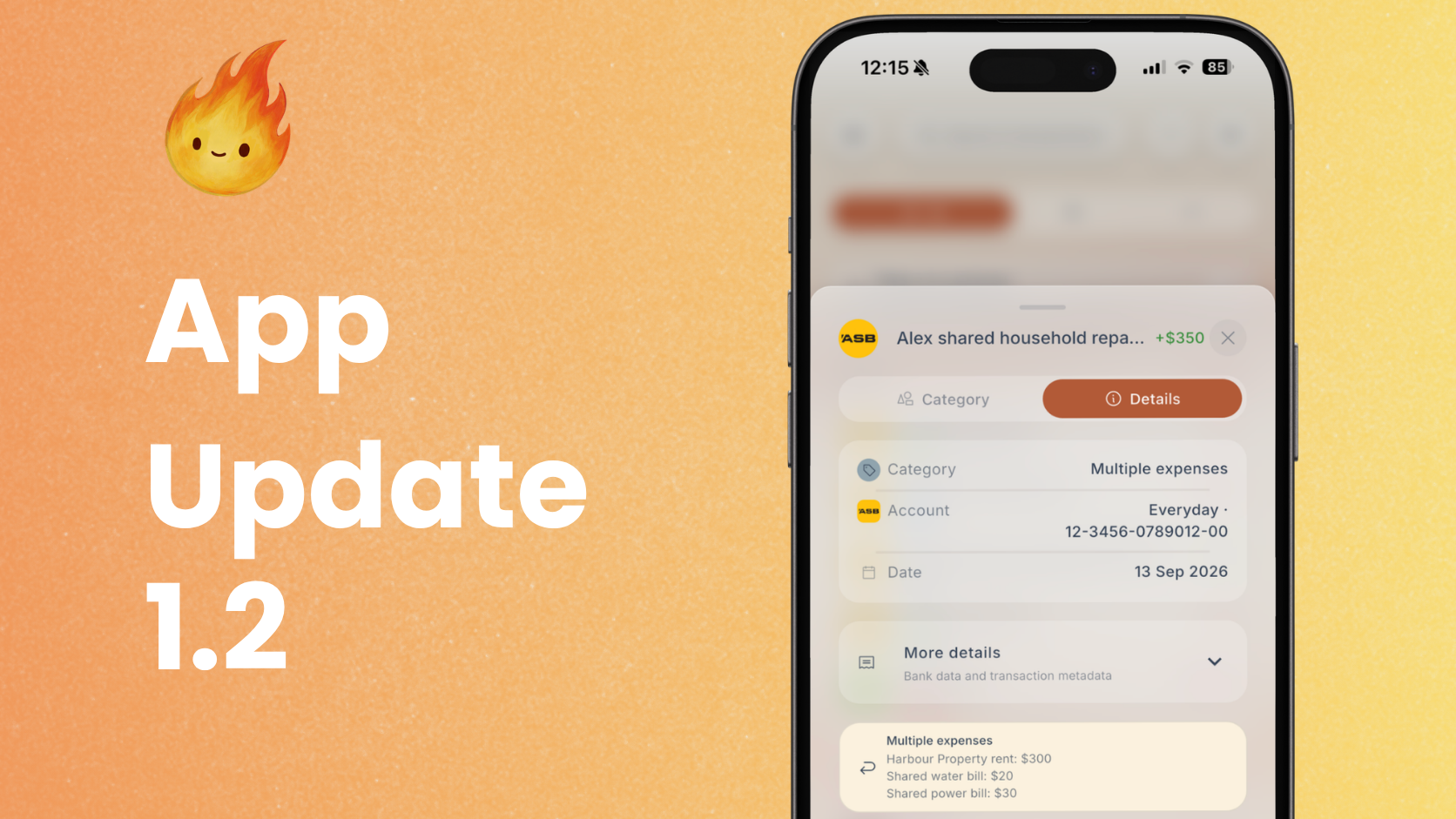
A single flatmate payment may cover rent, power and water. Treating that payment as one refund or as ordinary income can make both your budget and spending totals misleading.
In Fireball 1.2.1, Match as refund can allocate one incoming payment across several original expenses when the feature is available for your account.
For example, a $350 payment could include $300 for rent, $20 for water and $30 for power. Fireball applies each amount to the matching expense category, so the repayment does not inflate income or leave the original spending overstated.
You can also save a partial match. If $300 of a $350 payment repays rent, the remaining $50 stays as income. Fireball shows that result before you save and lets you choose the income category for the remainder.
Refund rules can remember common household repayment patterns. A complete, unambiguous match can be applied automatically, while changed amounts or uncertain bills are held for review. You remain in control of the saved result.
Refund matching changes how Fireball reports the activity. It does not move money, alter a bank transaction or request payment from another person.
Edits that survive a slow connection
Manual changes should not disappear because a connection is interrupted at the wrong moment.
Version 1.2.1 strengthens the way Fireball records eligible personal edits before completing cloud synchronisation. Pending work stays visible through refreshes and restarts, while older server information cannot silently replace a newer accepted change.
The Pending changes view explains work that still needs attention. Retry all can restart eligible items together, while an individual rejected change can still be reviewed or discarded explicitly.
Shared financial changes continue to wait for server confirmation because another person may be viewing or editing the same information.
Leave while bank history finishes importing
A newly connected account can take time to import its full supported history. Fireball 1.2.1 makes that work less dependent on keeping one screen open.
For supported bank connections, the import can continue after you leave the connection flow. Fireball restores progress when you return and can create an Inbox notification when the initial history is complete. A push notification is also requested when your device settings allow it.
The recovery work is tied to the exact account and import run. Fireball does not treat a few visible transactions as proof that the whole history is ready, and it does not repeat a completed import simply because the app restarted.
Version 1.2.1 also improves the way account status and institution artwork survive reconnection, refresh and account lifecycle changes.
Faster startup and smoother refreshes
Fireball 1.2.1 reduces repeated work while Home starts. Independent account, settings and session information can prepare together. Banking snapshots, transaction rules, recurring plans, payday dates and FIRE summaries reuse accepted preparation where the underlying information has not changed.
The result is less repeated calculation during startup and fewer unnecessary refreshes as account information settles.
Images and previews also reuse decoded results more effectively. This helps account and transaction artwork appear consistently without making the financial calculation wait for decorative content.
Better recurring reminders and balance previews
Recurring payment reminders are more reliable across multiple devices. Fireball keeps one notification identity for the same reminder and rechecks that the payment is still relevant before delivery.
Projected low balance settings now refresh the preview from the same forecast used elsewhere in Fireball. A newly enabled account can show that its preview is preparing, while an existing result remains visible until the updated forecast is ready.
These changes do not turn a forecast into a guarantee. New, irregular or delayed transactions can still change the actual balance, so the alert remains an early prompt to review the account.
Quicker actions in Activity and more personal layouts
Selection mode in Activity now brings the available actions together. After choosing transactions, you can open Actions for Category, Tags, Merchant, Export selected and Delete. Fireball keeps the rules of each action clear, so bank supplied records remain protected and linked manual transfers are handled as a pair.
Insights also becomes easier to arrange. You can choose the order of graphs within Overview, Spending and Wealth. On supported layouts, these preferences follow your signed in account. Native Insights keeps a focused selector that shows one graph at a time, while wider web layouts can show a broader workspace.
The FIRE card now includes a persistent What is FIRE? explanation, giving new users a simple introduction without changing their financial settings or projection.
One update, followed by a careful refinement
Fireball 1.2.0 is the larger foundation. It makes the core app useful to more people, gives disconnected accounts a practical continuation path and adds better tools for recurring payments and transaction data.
Fireball 1.2.1 is the refinement. It makes household repayments more accurate, protects work through unreliable connections, improves bank history recovery and removes repeated work from startup and refreshes.
Some capabilities depend on your plan, account type, supported bank connection and staged service availability. If a control described here is not visible, install the latest available Fireball version and check the relevant account or feature settings.
Get the latest Fireball update
Install the latest Fireball version available for your device. Version 1.2.1 includes the improvements from 1.2.0 as well as the newer reliability and refund updates.
After updating, useful places to explore include Profile for plan details, Accounts for Manual tracking, Activity for export and selection actions, Recurring for supported instalment plans, and Settings for Pending changes and notification controls.
Fireball 1.2 is about making your financial picture more dependable when real life does not fit a perfect workflow. Your history stays useful, your corrections are easier to trust and your next decision should take less effort to understand.
Make the next money decision calmer
Turn what you just read into a plan you can track, adjust, and actually live with. Explore our free financial calculators or see how Fireball brings your finances together.