Fireball is now available on the web
Use Fireball in your browser to connect your financial picture, organise transactions, build a budget and explore your path to financial independence on a larger screen.
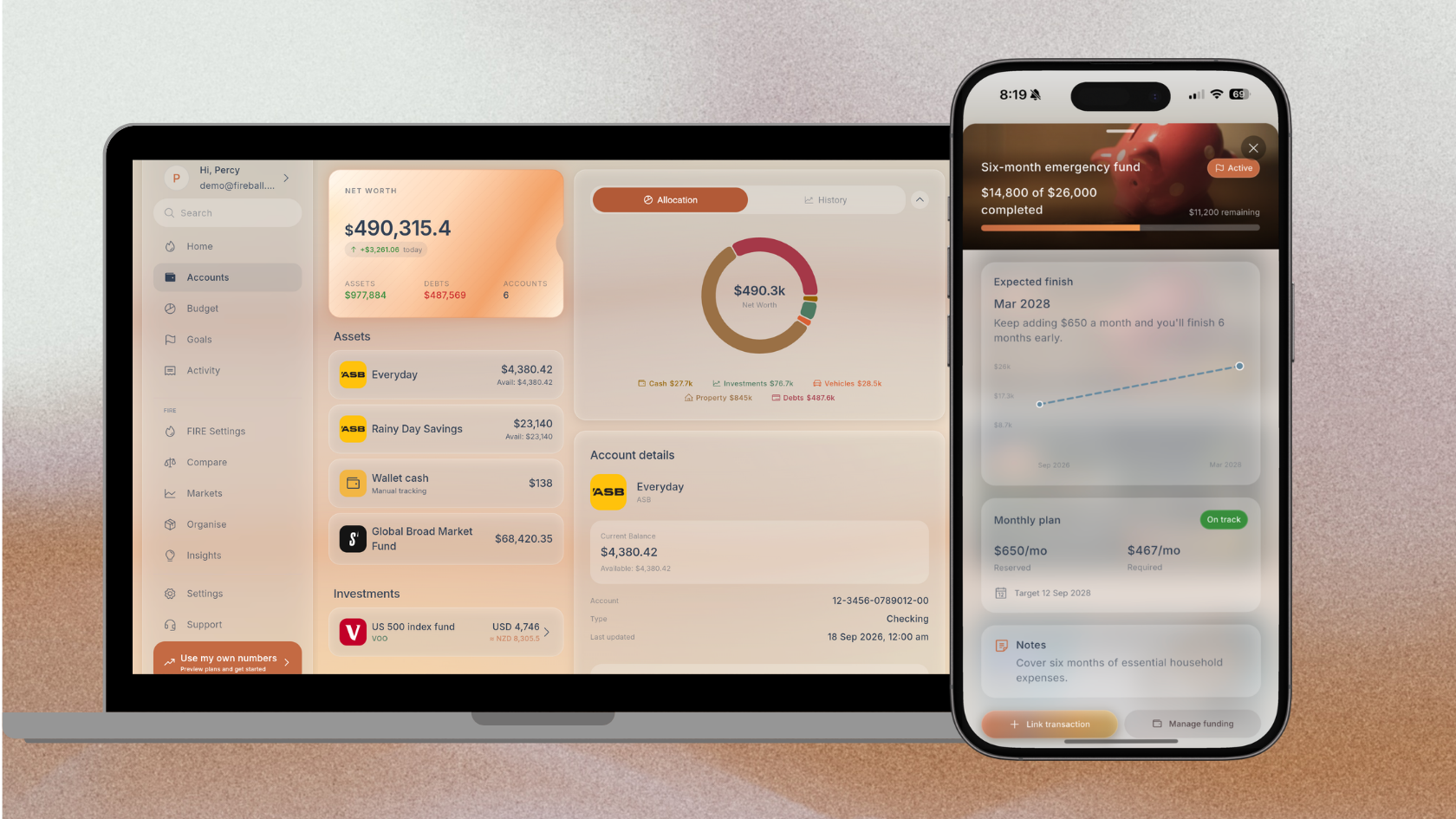
Some money decisions fit naturally into a few minutes on your phone. Others are easier when you can sit down, see more of the picture and take your time.
That is why Fireball is now available as a full web app.
You can open Fireball in your browser to review transactions, build a budget, understand your net worth and explore your path to financial independence. If you already use Fireball on iPhone or Android, sign in with the same account. If you are new to Fireball, you can create an account on the web or explore Demo first with fictional information.
Your financial picture, with more room to understand it
A phone is convenient when you want to check a balance or categorise a transaction. A larger screen can be more comfortable when you want to compare accounts, work through a budget or understand a long term projection.
Fireball uses the extra space to show related information together where the layout supports it. You can move through Home, Accounts, Activity, Budgets, Insights and planning tools without squeezing the detail into a phone sized view.
It is still Fireball, not a separate desktop product. The web app brings the same financial picture into a format that is easier to use for longer reviews.
What can you do in the Fireball web app?
Bring your accounts together
Connect supported New Zealand financial institutions through Akahu, or add eligible accounts and assets manually. Fireball brings balances, transactions, investments, property and debt into one financial picture.
Fireball receives the account and transaction information needed to provide its features. It does not receive or store your bank password, and it cannot move money or initiate a bank payment.
Organise your transactions
Review income and spending in Activity. You can correct categories, split a payment, apply tags, add notes, attach supporting files and use rules for changes that should repeat.
The larger view is particularly useful when you are cleaning up several transactions or trying to understand why a category total looks different from what you expected.
Build a budget that fits the way you think
Fireball supports Single, Category and Flex budgeting. You can plan weekly, fortnightly or monthly, or choose a period that lines up with payday.
Upcoming commitments and the choices in your budget feed into Safe to Spend, helping you see what may be available after the amounts you want to protect are considered.
Ask questions while you work through the numbers
With an eligible Paid plan and AI enabled, you can use Ask Fireball during the same planning session. Work through your budget, then ask a question about the financial picture Fireball has already calculated.
For example, you could ask:
- What were my largest spending categories this month?
- How does this month compare with the previous one?
- Am I on track for the retirement age in my FIRE plan?
- What information does Fireball use for Safe to Spend?
Ask Fireball can explain your figures and how the app works in plain language. It does not move money, connect accounts or approve changes for you. Important figures should still be checked, and usage limits apply.
See more than a bank balance
Insights can help you understand cash flow, spending categories, merchants, saving and changes in your wealth. Account forecasts can also estimate eligible balances over the days ahead.
These views turn separate transactions into questions you can act on. Is grocery spending rising because the main shop costs more, or because smaller visits are adding up? Did a pay increase improve the amount you kept? Is an upcoming payment likely to put pressure on an account?
Connect today with the future
Fireball brings KiwiSaver, other investments, property, cash and debt into its net worth and FIRE planning tools.
You can explore how retirement spending, contributions, investment growth and other assumptions could affect the plan. The projection is an estimate, not a promise or personalised financial advice, but it can make the trade offs easier to see.
Arrange the app around what matters to you
You do not have to keep every part of Fireball in its original position.
On Home, you can reorder sections, hide cards you do not need and restore the starting layout whenever you like. In Insights, you can choose the order of graphs within Overview, Spending and Wealth. On supported layouts, those preferences follow your signed in account.
This is more precise than saying every page can be rearranged. The navigation and individual pages keep a consistent structure, while the configurable sections and graphs let you decide what appears first.
For example, someone focused on day to day cash flow could place budgets and upcoming money near the top of Home. Someone working towards financial independence may prefer to see net worth, investments and FIRE progress first.
Four ways to use Fireball on the web
The web app is particularly useful when you want to do more than check one number.
Have a monthly money review
Open Activity and Insights to review the month, correct any categories that affect the totals and look for a change worth investigating. Then check the budget for the next period.
If Ask Fireball is available for your plan, you can ask it to explain a pattern you noticed. The assistant uses relevant information already available in Fireball, so you do not have to copy your transaction totals into a separate chat.
Plan for a change in income or spending
Use a larger screen to compare your recent cash flow, recurring activity and budget. Adjust the period where appropriate, then review how much room remains after the commitments you want to protect.
Ask Fireball can help explain the figures, but you decide what to change and save.
Sit down with your partner or another trusted person
Review the same financial picture together on a screen that is easier for two people to see. If you use Shared finances, the owner can invite a trusted person with Viewer or Editor access through their own verified Fireball login.
Viewer access is for reviewing shared information. Editor access allows permitted financial changes. Bank connections, billing, security and access management stay with the owner. AI chat remains available only in a person's own financial profile, not while viewing shared finances.
Build a workspace for your current priority
Move the Home sections and Insights graphs that matter most to the top, and hide Home cards that are not useful right now. You can change the arrangement again when your priorities change or restore the starting layout.
Start with Demo if you want to look around first
You do not need to connect an account just to see how Fireball works.
Explore Demo to open the web app with fictional financial information. No account or sign in is required. You can look through the main areas and see how transactions, budgets, net worth and FIRE planning fit together without using your own data.
When you are ready to use Fireball for your finances, leave Demo and create or sign in to your account.
Use the same Fireball account on web and mobile
The web app does not require you to start a second financial profile. Sign in with the same Fireball account you use on iPhone or Android.
Your financial information belongs to the same signed in Fireball profile, so you do not need to export a budget from one device and import it into another. Changes are available across the web and mobile apps after they have synced, subject to connection and access status.
The two experiences are useful at different moments:
- Glance at a native Fireball widget on your phone to check a budget, upcoming money, net worth, a goal or FIRE progress.
- Receive the notifications you have chosen on your mobile device and open Fireball when something needs attention.
- Make a quick transaction correction or check Safe to Spend while you are away from your computer.
- Later, open the web app for a monthly review, a detailed budget change or a longer planning session.
- Continue on mobile with the updated financial picture when you are on the move again.
For example, you might notice a budget warning on your phone during the week. At home, open Fireball on the web to review the relevant transactions, compare the category with earlier periods and adjust the plan if needed. The next time you open the mobile app, you can continue from the same signed in profile after syncing completes.
Or you might begin a FIRE scenario on the web because the larger view makes the assumptions easier to compare, then use your phone later to check progress without repeating the setup.
The mobile apps still have advantages that belong on a phone, including native home screen widgets and device notifications. The web app adds more room for review and planning. Neither replaces the other.
A practical way to try Fireball on the web
If this is your first visit, try the following:
- Open Demo and explore Home, Activity, Budgets, Insights and FIRE.
- Create an account when you are ready to use your own information.
- Connect a supported institution or begin with manual information.
- Check that income, expenses and transfers are categorised correctly.
- Choose a budget style and period that make sense for you.
- Add the parts of your net worth and long term plan that you want Fireball to include.
You do not need to finish everything in one sitting. Start with the part of your finances you most want to understand, then build the picture over time.
Be careful on a shared computer
Your Fireball account contains private financial information. If you use the web app on a shared or public computer, do not save your sign in details. Sign out when you finish and close the browser window.
On your own computer, use the security protections available on the device and keep your browser up to date.
Fireball now goes where your planning happens
Fireball began as a mobile experience, but personal finance does not happen in only one place.
The web app gives you the convenience of Fireball in a browser and the space to work through the decisions that deserve more attention. Your everyday spending, budget, net worth and long term direction can now sit together on the screen where you are ready to plan.
Try Fireball on the web or explore Demo with fictional data.
Make the next money decision calmer
Turn what you just read into a plan you can track, adjust, and actually live with. Explore our free financial calculators or see how Fireball brings your finances together.